New features
Automatic visualization of raw ROS messages
Previously, you could already visualize ROS messages without converting them to Rerun's semantic types at ingest time by configuring component mappings in a blueprint. However, this can be a tedious process!
The Viewer's heuristic blueprint is now aware of various ROS types and configures these runtime mappings automatically where supported.
For example, std_msgs/msg/String appears as text, while sensor_msgs/msg/Temperature and sensor_msgs/msg/FluidPressure appear as a Measurements archetype with units and variance bands.
Currently supported: std_msgs/msg/String, sensor_msgs/msg/Temperature, sensor_msgs/msg/FluidPressure, sensor_msgs/msg/RelativeHumidity, sensor_msgs/msg/Illuminance, and sensor_msgs/msg/MagneticField.
Other ROS 2 messages still need import-time conversion to be visualized automatically.
See Supported Message Formats for details.

New streaming dataset-query pipeline enabled by default
Dataset queries now stream through a redesigned client pipeline. Fetches are planned up front and issued in emission order, memory is bounded by a single byte window instead of a mix of gates and budgets, and cancellation reliably aborts in-flight downloads. Behavior changes to be aware of:
- Rows are never emitted before a segment's static chunks have arrived, so results on datasets with late-arriving static data are now complete where they could previously miss static values.
- The
RERUN_PIPELINE_BUDGET_*andRERUN_SEGMENT_ADMISSION_*environment variables no longer affect the default path. The new knobs areRERUN_DATAFRAME_WINDOW_BYTESandRERUN_DATAFRAME_FETCH_CONCURRENCY.
Set RERUN_DATAFRAME_PIPELINE=v1 to fall back to the previous pipeline.
The fallback will be removed in the next release.
Experimental: more ways to read and drive the viewer from Python
rerun.experimental.ViewerClient has new methods that read recording, dataset, and table schemas, read and write blueprints, inspect the transform graph, list and run command palette commands, highlight a part of the screen, capture a profile, and take a screenshot as PNG bytes with take_screenshot.
Some methods are renamed:
open_url is now open, which also takes several URLs and returns the store ids it opened;
close_recordings is now close, which also closes the recordings loaded from a URL;
and viewer_state and viewer_logs are now get_state and get_logs.
The old names still work, but are deprecated.
close, which shut down a spawned viewer, is now quit.
The API is experimental.
Experimental: typed viewer API in the JS web viewer
WebViewer has new typed methods to read and drive the viewer: get_state, set_time, get_location, and set_location.
Others read and write blueprints, read recording, dataset, and table schemas, inspect the transform graph, read the viewer's logs, run command palette commands, highlight a part of the screen, and take screenshots.
// Which recordings are open, and the time range of each of their timelines:
const state = await viewer.get_state();
for (const recording of state.recordings) {
  for (const timeline of recording.timelines) {
    console.log(recording.store_id, timeline.name, timeline.time_range);
  }
}

// Seek the active recording to frame 42, and play from there:
await viewer.set_time({ timeline: "frame", sequence: 42, play_state: "playing" });
The API is experimental.
The older methods for the active recording, timeline, time, time range, and play state (get_active_recording_id, set_current_time, get_time_range, set_playing, …) still work, but are deprecated in favor of it.
open and close now return promises: open waits for the load and reports the recordings it opened, and close also takes store ids.
See the viewer_control example and Embed a Rerun Viewer.
Other
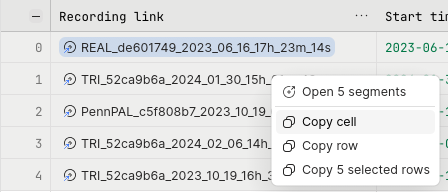
Copy table cells and rows from the context menu: Right-click a table cell to copy the full, untruncated value of the cell, its row, or all selected rows.
Hovering truncated table cells shows full content now: Hovering a value that is truncated, in a table cell or a list, now shows all of it in a tooltip. Long text is shown in full, and nested data such as structs and lists is shown as an expandable tree.
More scalable text log view: The text log view now scales to much larger logs. When connected to a store, it loads log data lazily as you navigate instead of loading the entire log up front.
Segment preview time controls in blueprint:
rrb.table.PreviewsConfignow hasplay_state,playback_speed, andstart_point, so a table blueprint can start all segment previews playing at a given point and speed. Thererun.blueprint.tableAPI is experimental. See Configure table layouts and segment previews.Dataset schema is fetched once per revision:
DatasetEntryandDatasetSelectionnow cache the dataset schema per dataset revision, so repeatedreader()calls no longer each cost a round trip to the server. A registration or unregistration made from the same process shows up in the next read. A change made by another client shows up once this process sees a newer revision of the dataset.Segment.schema()can include assets:Segment.schema(include_assets=True)adds the columns of the assets that apply to the segment, matching the schema ofDatasetEntry.segment_store(…, include_assets=True). The default,include_assets=False, returns the segment's own layers only, as before.C++: configurable gRPC flush timeout:
RecordingStream::connect_grpcandGrpcSinktake aflush_timeout(astd::chronoduration), which bounds how long a flush waits for the connection to be established. It defaults to 5 seconds, as before. In the C API,rr_recording_stream_connect_grpcandrr_grpc_sinktake the same parameter asflush_timeout_sec.The
rerun_get_viewer_stateandrerun_get_viewer_logsMCP tools are nowrerun_get_stateandrerun_get_logs: The viewer's MCP tools take their names from the ViewerControl operations, which are nowGetStateandGetLogs, matchingget_state()andget_logs()in Python and JavaScript.
Breaking changes
Chained filter_contents() calls intersect
Calling filter_contents() on a DatasetSelection now narrows it, as chained filter_segments() calls already do: an entity is kept only if every call selects it.
Previously, each call added its expressions to the earlier ones, so a later call could widen the selection or include an entity that an earlier call excluded.
Expressions passed in a single call behave as before.
Since each call is evaluated on its own, a call with only exclusions selects nothing. To combine several subtrees, or includes with excludes, pass them all in one call. To exclude entities from an existing selection, start from everything and exclude from there:
# Before: selected both subtrees. Now: selects nothing.
selection = dataset.filter_contents("/robot/**").filter_contents("/camera/**")

# Selects both subtrees, before and now.
selection = dataset.filter_contents(["/robot/**", "/camera/**"])

# Before: selected `/robot/**` without `/robot/debug/**`. Now: selects nothing.
selection = dataset.filter_contents("/robot/**").filter_contents("-/robot/debug/**")

# Selects `/robot/**` without `/robot/debug/**`, before and now.
selection = dataset.filter_contents(["/robot/**", "-/robot/debug/**"])

# Selects `/robot/**` without `/robot/debug/**`, narrowing an existing selection.
robot = dataset.filter_contents("/robot/**")
selection = robot.filter_contents(ContentFilter.everything().exclude("/robot/debug/**"))
Experimental: table columns show and edit any component type
A table blueprint column can now be shown as any component, e.g. rr.components.Text, rr.components.Url or rr.components.Thumbnail.
Boolean columns show as checkboxes by default, and rr.components.Flag shows them as flag buttons.
Editing is no longer limited to flags: any editable column whose component type has an editor in the Viewer can be edited, including plain text and number columns.
Column(cell=…) is renamed to Column(column_type=…), and LinkCell, ThumbnailCell, FlagCell and EntryKindCell are removed in favor of component classes:
# Before
rrb.table.Column("reviewed", editable=True, cell=rrb.table.FlagCell())

# After
rrb.table.Column("reviewed", editable=True, column_type=rr.components.Flag)
Existing table blueprints will be automatically migrated.
See Configure table layouts and segment previews.
The rerun.blueprint.table API is experimental and may change in future releases.
The new Bool, Flag, Url, Thumbnail and EntryKind components are unstable, and their data may not stay backwards compatible.
Duplicate and segment-limit registration failures are reported by the registration task
register() and register_prefix() no longer fail up front when a segment layer already exists (on_duplicate=OnDuplicateSegmentLayer.ERROR, the default) or when an asset dataset is at its segment limit.
The call now succeeds and returns a handle; wait() raises for the duplicate or overflowing segment, and the other segments in the same call are registered.
This matches how schema conflicts and per-segment limits were already reported.
The asset segment limit now counts segment layers, as Rerun Hub does, so a new layer on an existing asset takes a slot.
Migration
No SDK change or upgrade is needed: the protocol is unchanged, and every SDK version already reports a failed registration task from wait().
The servers stay compatible with older clients, which stop seeing the up-front error and see the task failure instead.
Code that caught AlreadyExistsError around register() should catch the wait() error instead:
Python, before:
try:
    dataset.register([uri], on_duplicate=OnDuplicateSegmentLayer.ERROR).wait()
except AlreadyExistsError:
    ...
Python, after:
try:
    dataset.register([uri], on_duplicate=OnDuplicateSegmentLayer.ERROR).wait()
except ValueError as err:
    # The message names the segment and layer: "… already exists".
    ...
Rust, before:
match client
    .register_with_dataset(dataset_id, sources, IfDuplicateBehavior::Error)
    .await
{
    Err(err) if err.kind == ApiErrorKind::AlreadyExists => {
        // The segment layer was already registered.
    }
    Err(err) => return Err(err),
    Ok(handle) => {
        handle.wait(timeout).await?;
    }
}
Rust, after:
let handle = client
    .register_with_dataset(dataset_id, sources, IfDuplicateBehavior::Error)
    .await?;
match handle.wait(timeout).await {
    Err(RegistrationError::Failed(err)) if err.kind == ApiErrorKind::InvalidArguments => {
        // The message lists the failed segments; the others are registered.
    }
    Err(err) => return Err(err.into()),
    Ok(segment_ids) => {}
}
ViewerClient.set_time takes a play_state
In rerun.experimental.ViewerClient.set_time, the play: bool argument is replaced by play_state, which is "paused", "playing", "following", or None.
If you omit it, the viewer now keeps playing or stays paused as it was, instead of pausing.
The time is now optional too, so you can switch timelines, or play, pause, or follow the latest data, without moving the time cursor.
# Before
viewer.set_time("frame", sequence=42)  # paused
viewer.set_time("frame", sequence=42, play=True)

# After
viewer.set_time("frame", sequence=42, play_state="paused")
viewer.set_time("frame", sequence=42, play_state="playing")
viewer.set_time(play_state="following")
Update to Rust 1.98
The Rust SDK now requires Rust 1.98 or later.
Run rustup update to get it.
Rust: build_info() removed, the binary passes in its build info
rerun::build_info() and re_viewer::build_info() have been removed.
re_server::RerunCloudHandlerBuilder::new, re_server::Args::create_server_handle, and re_server::Args::run_async now take the BuildInfo of the binary hosting the server.
To get the build info of your own binary, call re_build_tools::export_build_info_vars_for_crate("<your crate>") from its build.rs, and use re_build_info::build_info!():
// Before
re_crash_handler::install_crash_handlers(re_viewer::build_info());

// After
re_crash_handler::install_crash_handlers(re_build_info::build_info!());
If you only need the version of the Rerun crates, use re_build_info::CrateVersion::LOCAL.
Looking for an older release? See the migration guides for 0.33 and earlier.