Highlights
Text in any language, and color emoji
The Viewer no longer renders unknown characters as tofu boxes (□). Text that the bundled font cannot cover, such as Chinese, Japanese, Korean, Arabic, Hebrew, Devanagari, or Thai, is now rendered with a font from your system. Emoji render in color, the way the rest of your desktop shows them.
This applies to everything the Viewer shows: entity paths, labels, text logs, and any string in your data.
New features
Experimental raymarched 3D volumes
The new Volume3D archetype allows visualizing dense scalar volumes in 3D views.
This can be useful, for instance, to visualize 3D medical scans.
Volume3D is unstable: it may change in future releases in a way that the data won't be backwards compatible.
Our DICOM loader example has been updated accordingly:
Experimental audio: AssetAudio archetype and AudioView
Audio files (.aac, .flac, .m4a, .mp3, .ogg, .wav) can now be logged as-is with the new AssetAudio archetype, or imported by opening or dropping them into the viewer.
The new audio view shows the waveform and plays the audio while time is playing on a temporal timeline, starting from the time the asset was logged.
Playback follows the playback speed between 0.25x and 4x, and each view has its own volume setting.
AAC is limited to AAC-LC for now.
AssetAudio is unstable: it may change in future releases in a way that the data won't be backwards compatible.
AssetAudio reference
AudioView reference
Raw Bayer images
Image supports raw Bayer images through new PixelFormat variants for the RGGB, BGGR, GBRG and GRBG patterns, at 8 bits per pixel.
The viewer interprets Bayer samples as linear color values and demosaics them on the GPU.

See PixelFormat.
PLY mesh and 2D point support
Rerun can now load PLY files containing meshes and 2D point clouds, in addition to 3D point clouds and Gaussian splats.
PLY loading also uses the faster ply-rs-bw 4 API.
Opening files in Rerun PLY and STL example
Smoother plot lines
Plot lines are thicker, no longer dim, better antialiased, and no longer zig-zag on dense data.
Improved viewer performance with many entities and views
The viewer now renders recordings with many entities and blueprints with many views faster. The more views a blueprint has, the bigger the gain.
| Entities | Views | Before | After | Speedup |
|---|---|---|---|---|
| 940 | 8 | 3.6 ms | 2.5 ms | 1.4× |
| 940 | 32 | 4.7 ms | 2.8 ms | 1.7× |
| 940 | 128 | 8.5 ms | 4.1 ms | 2.1× |
| 4,700 | 8 | 18.2 ms | 13.5 ms | 1.3× |
| 4,700 | 32 | 19.9 ms | 14.0 ms | 1.4× |
| 4,700 | 128 | 27.2 ms | 15.6 ms | 1.7× |
| 18,800 | 8 | 84.5 ms | 66.8 ms | 1.3× |
| 18,800 | 32 | 95.2 ms | 67.9 ms | 1.4× |
| 18,800 | 128 | 130 ms | 69.7 ms | 1.9× |
Median frame time of a viewer with views in tabs, measured on an Apple M4 with 10 cores.
The viewer still has many issues with many entities, specifically with some UI open, like the time panel. But this change, caching some queries that were done each frame before, is a great step towards handling many entities smoothly.
Configure the state timeline time axis
The state timeline view now supports configuring its time axis through the blueprint time_view property, just like time series.
Pan and zoom changes are saved to the blueprint, and the view supports explicit time ranges, zoom locking, and a shared time axis with other plots.

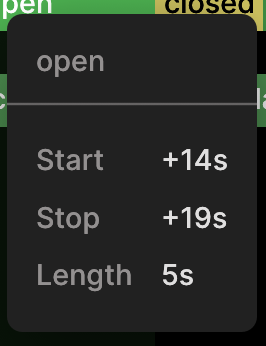
State timeline hover duration
State timeline hovers now show a human-readable Length.
Rerun Viewer in marimo notebooks
The notebook Viewer now works in marimo notebooks: rr.notebook_show(), Viewer.display(), and a Viewer or blueprint as the last expression of a cell all show an embedded Viewer.
marimo delivers messages from the Viewer only between cells, so to stream data live, create the Viewer in one cell and log to it from a later one.
Embed Rerun in notebooks marimo example notebook
New table blueprints with Python table API
Today, there are two types of tables in the Rerun catalog, table entries and segment tables associated with datasets. In a recent release we introduced special table blueprints to configure them. Tables can be configured with two different layouts: table layouts and card layouts (which are particularly useful for segment previews!).
In this release, we're making table blueprints more powerful and adding a rerun.blueprint.table Python API to configure them more conveniently!
Example:
from pathlib import Path

import rerun as rr
import rerun.blueprint as rrb

blueprint = rrb.TableBlueprint(
    table_layout=rrb.table.TableLayout(
        # Hide a column
        columns=[rrb.table.Column("episode_notes", visible=False)],
    ),
    # Cards become the default layout unless default_layout="table".
    card_layout=rrb.table.CardLayout(
        title="uuid",  # Use the uuid column as the card title.
        link="recording_uri",  # Clicking the card should open the recording.
        fields=[
            rrb.table.Column(
                "recording_uri",
                name="Recording",
                # Show a 3D view for recordings in this row.
                cell=rrb.table.PreviewCell(rrb.Spatial3DView()),
            ),
            # Columns on the card layout are opt-in.
            rrb.table.Column("current_task"),
        ],
    ),
    # Configure the timeline used by previews.
    previews_config=rrb.table.PreviewsConfig(timeline="real_time"),
)
path = Path("table.rbl").resolve()
blueprint.save("my_app", path)

client = rr.catalog.CatalogClient("rerun+http://localhost:51234")
client.get_table("my_table").register_blueprint(path.as_uri())
There's also a new doc page: Configure table layouts and segment previews for the full workflow, including dataset and remote storage. The existing table blueprints example has of course been updated as well.
Improved table column settings, with search, display mode and bulk hide/show
With this update, organizing columns in your table got a lot more convenient! You can now filter the column list, bulk hide/show columns and set the new display mode to choose if you want to see a short and humanized name or the full physical path.
Playback controls for segment previews
Previews in the table and card views now have a new UI, which comes with more time controls:
Configure table layouts and previews
Assets can specify what segments they apply to
register_asset now takes a mode and a list of segments, so an asset no longer has to apply to every segment of a dataset.
The default mode="opt_out" applies the asset to every segment except the ones listed, while mode="opt_in" applies it only to the ones listed.
dataset.register_asset("s3://…/mesh.rrd", mode="opt_in", segments=["episode_0", "episode_1"])Which segments an asset applies to can be changed afterwards with add_segments_to_asset and remove_segments_from_asset.
Use assets_for_segment to get a list of assets that apply to a segment.
See assets for what an asset is.
String literals in lens selectors
Lens selectors now support string literals such as "foo" to emit one constant string per input value.
For example, .location.x | "foo" emits "foo" once per selected value, without a custom function.
Agents can read and write the active blueprint over MCP
The new GetBlueprint operation, served as the rerun_get_blueprint MCP tool, returns a recording's active blueprint as JSON, one entry per blueprint entity with its archetypes and their fields:
{
  "/view/1f2e…": { "ViewBlueprint": { "class_identifier": "3D", "space_origin": "/world" } },
  "/view/1f2e…/ViewContents": { "ViewContents": { "query": "+ /world/**" } },
  "/viewport": { "ViewportBlueprint": { "root_container": "4a8c…" } }
}
The new SetBlueprint operation, served as rerun_set_blueprint, replaces the whole blueprint with JSON of the same form.
See the MCP reference.
Agents can read a recording's schema over MCP
GetViewerState — and with it the rerun_get_viewer_state MCP tool and ViewerClient.viewer_state() — now reports the Viewer's version, so a caller no longer has to shell out to rerun --version and hope it found the same binary.
The new GetRecordingSchema operation, served as the rerun_get_recording_schema MCP tool, describes an open recording: every entity, the components logged on each, whether a component has a static value, and its Arrow datatype.
{"component": "Points3D:positions",
 "archetype": "rerun.archetypes.Points3D",
 "component_type": "rerun.components.Position3D",
 "datatype": "FixedSizeList(3 x non-null Float32)",
 "has_static": true}
It works for any recording the Viewer has open, including one streamed from an SDK or imported from another file format, which the catalog cannot answer for.
A recording too large for one answer comes back truncated with a count of what was left out, and entity_path narrows to a subtree.
paths_only answers the cheaper question first — which entities exist at all — so an unfamiliar recording can be listed whole and then read in detail only where it matters.
See the MCP reference.
ViewerState reports what is still loading
GetViewerState — and with it the rerun_get_viewer_state MCP tool and ViewerClient.viewer_state() — now lists the data sources the Viewer is still loading from.
state = client.viewer_state()
while state.loading:
    print(state.loading[0].status)  # "Loading /path/to/dataset…"
    state = client.viewer_state()
open_url returns as soon as a load starts, and a recording shows up as soon as its first message lands, so this is how a caller tells a recording that is still arriving from one that arrived empty.
Sources that only wait for someone else to send data, such as an SDK connection, are left out: they never finish.
See the MCP reference.
Import puffin profiler captures
Opening a .puffin file in the viewer now loads it as a recording.

The viewer writes these files itself through the "Capture profile trace" command, so a capture can be taken in one viewer and inspected in another.
rerun dump-puffin
rerun dump-puffin recording.puffin > out.json converts a puffin profiler recording (.puffin file) into a single JSON document, so the scope tree can be inspected with tools like jq, or by an agent, without compiling any Rust.
See the CLI manual for details.
Support creating a FileSink from arbitrary std::io::Write streams
It is now possible to wrap any Rust std::io::Write stream in a FileSink, using FileSink::new_stream() or FileSink::new_stream_with_options().
Disable startup version checks in the web viewer
The JavaScript and React web viewer APIs now accept check_for_updates_on_startup: false to disable startup version checks, overriding the saved user preference.
Other
- Every panel, button and input has an accessible name: Every panel, icon button, menu and input in the Viewer now has a name in the accessibility tree, so screen readers,
egui_kittestqueries and the MCP UI tools can reach them by name. - Views can hide their title bar: Views take a new
titlebarblueprint option, for examplerrb.Spatial2DView(titlebar=False), which hides the view's title bar. - Agents can run any command palette command: The Viewer MCP server and
ViewerControlServicecan now list and run every command of the command palette, such as toggling panels, playback, and blueprint undo (docs). - Viewer state lists connected servers:
GetViewerState— and with it thererun_get_viewer_stateMCP tool — now lists the Redap servers in the left panel, with the name, kind, and URL of every dataset and table on each, so an agent can open one by name. See the MCP reference. - Pick the agent's model in the agent panel: The model shown in the agent panel's footer is now a drop-down for switching to any other model the agent offers.
- Paste images into the agent panel: Ctrl/Cmd-V in the agent panel's composer attaches the image on the clipboard.
- Set the memory limit of the web viewer: The JS
WebViewerhas a newmemory_limitoption, e.g."500MB". - URDF importer supports quaternions (URDF 1.1): Rerun's URDF importer now supports the
quat_xyzwrotation field that was recently added to the URDF specification version 1.1 as an alternative to therpyfield. - HDF5 attributes support more types: Import HDF5 attributes with 8- and 16-bit integer, 32-bit floating-point, and fixed- or variable-length string types.
- OSS server write access grants: The OSS server can now issue write access grants, which lets clients upload catalog objects through the server.
Breaking changes
rerun-sdk installs rerun as a top-level package
The rerun-sdk wheel now installs rerun, rerun_cli, and rerun_bindings directly into site-packages, instead of under site-packages/rerun_sdk/ with a rerun_sdk.pth file.
This means import rerun works in a running notebook kernel right after %pip install rerun-sdk, without a restart.
If you added site-packages/rerun_sdk to PYTHONPATH or to a build rule (for example in Bazel) to work around the .pth file, remove it.
The rerun and rerun-sdk packages on PyPI install the same rerun directory, so do not install both.
WriteChunks removed
The legacy WriteChunks API has been removed; see the migration guide.
Instead, use the experimental CatalogClient.stage() API to upload local files or bytes to catalog storage before registering them with a dataset.
This API may change in future versions.
Breaking changes to custom Rust views
These changes only affect the Rust API for custom views.
Property reflection metadata
ViewReflection now requires a property_archetypes field describing the view's property archetypes in display order.
Use property_archetypes: vec![] for views without properties.
Listed property archetypes must have reflection metadata available to the Viewer.
Selection-panel UI
Previously, ViewClass::selection_ui rendered directly into the fixed "View properties" section, while ViewClass::visualizers_section optionally supplied a separate visualizers section.
Custom views could not hide the standard entity-path filter or add their own top-level sections through these APIs.
ViewClass::selection_ui now takes a ViewContext and returns a ViewSelectionUi configuration instead of rendering directly and returning a Result.
Custom views can now:
- Hide the standard entity-path filter with
show_entity_filter. - Configure the visualizers section and its add-visualizer menu through
visualizers. - Insert titled, collapsible
extra_sectionsbetween the visualizers and view properties. - Replace the "View properties" contents with a
blueprint_propertiescallback, or leave it unset to render the reflected property archetypes automatically.
Views that only listed properties by hand can omit this method once those properties are declared in their reflection metadata. To replace the automatic property UI, move custom UI into a callback:
fn selection_ui<'a>(
    &'a self,
    _ctx: &re_viewer_context::ViewContext<'_>,
) -> re_viewer_context::ViewSelectionUi<'a> {
    re_viewer_context::ViewSelectionUi::properties_ui(|ui, ctx| {
        ui.label(format!("View: {:?}", ctx.view_id));
        Ok(())
    })
}
The callback's ctx.view_state is shared rather than mutable; state changes require interior mutability or queued actions for the view's mutable update/render path.
To customize individual property fields, render the remaining fields with re_view::view_property_ui_with_hidden_components and the custom fields with re_view::view_property_component_ui_custom inside the callback.
ViewClass::visualizers_section has been removed; return its output through ViewSelectionUi::visualizers instead.
This API remains unstable and will continue to evolve. Expect further breaking changes as we refine selection-panel customization for custom views.
Looking for an older release? See the migration guides for 0.33 and earlier.