This page covers the catalog server's object model. For logging and recording basics, see Recordings. For API details, see the Catalog SDK reference.
Catalog
We refer to the contents stored in a given catalog server as the catalog. The catalog contains top-level objects called entries.
There are currently two types of entries: tables and datasets. Each is described in more detail below.
Entries share a few common properties:
- id: a globally unique identifier
- name: a user-provided name, which must be unique within the catalog
Renaming a catalog entry
The id of a catalog entry is immutable, but the name can be changed provided it remains unique.
In Python, call set_name() on an entry to rename it on the catalog server, for example:
client = rr.catalog.CatalogClient(…)
dataset = client.get_dataset("old_name")
dataset.set_name("new_name")
Structuring datasets
When working with larger amounts of data, it can be useful to organize catalog entries in a directory-like structure.
This can be done by using . delimiters in the names.
The screenshot below is an example of a dot-delimited dataset name showing up as a directory tree in the viewer's data source browser:

Table entries
Table entries model a single table of data. They use the Arrow data model, so a table is logically equivalent to an Arrow table. As a result, tables possess an Arrow schema.
Tables support the following mutation operations through the Catalog SDK:
- append: add new rows to the table
- overwrite: replace the entire table with new data
- upsert: replace existing rows (based on an index column) with new data
Thanks to DataFusion, tables also support most database operations such as querying, filtering, joining, etc. See Storing query results in catalog tables for a complete example using these operations.
Datasets
Dataset entries model a collection of Rerun data organized in episodes such as recorded runs of a given robotic task. These episodes within datasets are called segments, which are identified by a segment ID.
Segments are added to datasets by the process of registering a recording (typically stored in some object store such as S3) to the dataset using the Catalog SDK.
The recording ID of the .rrd file is used as its segment ID.
Keep one recording per registered .rrd file.
Rerun Hub registers each file as a single segment, named after the first recording in it.
Recordings registered to a given segment are organized by layers, identified by a layer name.
By default, the "base" layer name is used.
Registering two .rrd files with the same recording ID (that is, with the same segment ID) to the same dataset, and using the same layer name, throws an error by default.
Pass on_duplicate=OnDuplicateSegmentLayer.REPLACE to register() to overwrite the existing layer, or SKIP to leave it in place.
Additive registration can be achieved by using different layer names for different .rrds with the same recording ID/segment ID.


Layers are immutable and can only be overwritten by registering a new .rrd file. In other words, datasets support the following mutation operations:
- create segment: by registering a
.rrdwith a "new" recording ID - append to segment: by registering a
.rrdwith a matching recording ID to a new layer name - overwrite segment layer: by registering a
.rrdwith a matching recording ID to an existing layer name, withon_duplicate=OnDuplicateSegmentLayer.REPLACE
Managing segment layers with the Python catalog API
Use DatasetEntry.segment() to get a handle to a segment, inspect its current layers, or get its Viewer URL.
Call delete_layer() to unregister one layer from that segment, then wait for the returned handle to track completion.
Unregistering removes catalog references but does not delete the underlying source objects.
segment = dataset.segment(segment_id)
print(segment.layers())
print(segment.url)

unregistration = segment.delete_layer("predictions")
unregistration.wait()
To inspect a named layer across the dataset, use dataset.layer(name).segment_ids().
The layer handle reads current membership on each call, including registrations and removals made after the handle was created.
See finding segments in a layer for an example.
See the Segment API reference for details.
Schema
Datasets are based on the Rerun data model, which consists of a collection of chunks of Arrow data. These chunks hold data for various entities and components corresponding to various indexes (or timelines). A given collection of chunks, say, a dataset segment, defines an Arrow schema. We refer to this as schema-on-read, because the schema proceeds from the data, and not the other way around. This differs from the table model, where the schema is defined upfront (schema-on-write).
In this context, the schema of a dataset is the union of schemas of its segments, which themselves are the union of the schemas of their layers.
Use segment.schema() to fetch a snapshot of one segment's schema across its registered layers.
Referenced assets are excluded from the segment's schema.
segment_schema = dataset.segment(segment_id).schema()
print(segment_schema)
print(dataset.schema())
print(dataset.schema().to_arrow())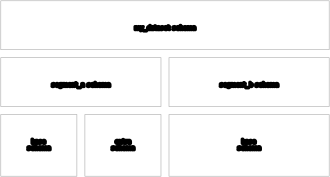
Datasets maintain a minimal level of schema self-consistency.
Registering a .rrd whose schema is incompatible with the current dataset schema will result in an error.
In this context, incompatible means that the schema of the new .rrd contains a column for the same entity, archetype, and component, but with a different Arrow type.
Such an occurrence is rare, and practically impossible when using standard Rerun archetypes.
Blueprints
A dataset can be assigned a blueprint.
This is done by registering a .rbl blueprint file typically stored in object storage to the dataset.
A dedicated API exists for this in the Catalog SDK: DatasetEntry.register_blueprint().
In that case, the blueprint is applied to all segments of the dataset when visualized in the Rerun Viewer.
A separate table blueprint can be used to configure the segment table itself: columns, card layouts, and embedded segment previews. See Configure table layouts and segment previews for the complete save-and-register workflow.
Assets
An asset is static data registered on a dataset and shared by all of its segments, such as a robot URDF, a room mesh, or a calibration. Registering it once as an asset means it does not have to be copied into every recording.
Like blueprints, assets live in their own dataset, owned by the dataset they belong to. Deleting the dataset also deletes its asset dataset and the asset storage.
Assets are registered from a .rrd file that the server can read, using DatasetEntry.register_asset():
client = rr.catalog.CatalogClient(…)
dataset = client.get_dataset("my_dataset")

asset_id = dataset.register_asset("s3://bucket/robot_mesh.rrd")
print(dataset.assets())

dataset.unregister_asset(asset_id)
Asset datasets have some restrictions to keep them light, and the server rejects registrations that:
- contains temporal data, since an asset may only contain static data
- is larger than 300 MiB
- would bring the dataset above 12 assets
When the Rerun Viewer opens a segment, it loads the dataset's assets along with the segment's own data. The asset data is cached, so opening another segment of the same dataset does not download it again. The assets tab of a dataset lists the registered assets and their metadata, and lets you register and unregister them right in the viewer.
Assets also show up in the python chunk processing api if include_assets is True:
segment_id = dataset.segment_ids()[0]

# Covers the chunks of both the segment and the dataset's assets.
store = dataset.segment_store(segment_id)
for chunk in store.stream().to_chunks():
    print(chunk.entity_path)

# Covers only the segment, and no asset manifests are fetched.
segment_only = dataset.segment_store(segment_id, include_assets=False)
Fetching an asset's manifest costs one request per asset, so include_assets=False is worth it when you only care about the segment's own data.
The dataframe query APIs are the exception: they stay on the dataset's own segments, so assets never show up there.
DatasetEntry.schema(), DatasetEntry.segment_ids(), DatasetEntry.segment_table() and DatasetEntry.reader() all ignore the asset dataset.
The asset dataset is hidden, so it is also left out of CatalogClient.datasets() unless you pass include_hidden=True.
To query asset data, target the asset dataset itself, which is a regular dataset with one segment per registered asset:
asset_dataset = dataset.asset_dataset()

print(asset_dataset.schema())

# Assets only hold static data, so there is no index to read along.
df = asset_dataset.reader(index=None)