Highlights
Measurements archetype
The new Measurements archetype logs scalar values together with their uncertainty.
Use it for sensors that report a value and a variance: pressure, temperature, illuminance, relative humidity, range, and so on.
In a time series view each series is drawn as a line with a translucent band around it, one standard deviation (the square root of the variance) wide in each direction.
Leave variances unset for values whose uncertainty is unknown.
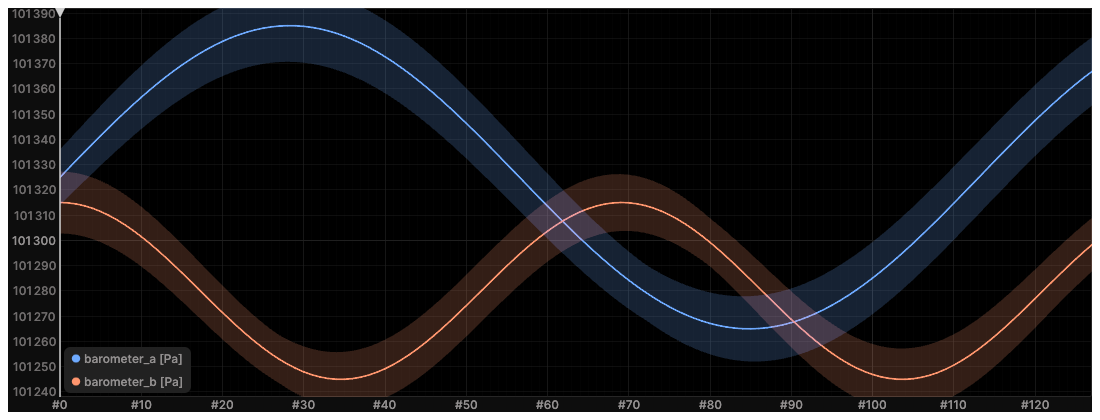
Two new components come with it.
Variance holds σ², in the units of the value squared, where 0 means a perfectly known value and draws no band.
Unit holds a display-only unit such as "Pa" or "lux", shown in the legend and in tooltips.
Unlike Scalars, this archetype carries its own styling, so values and style are logged in one call:
rr.log(
    "pressure",
    rr.Measurements(
        values=pressures,
        variances=variances,
        units="Pa",
        colors=[[121, 187, 255], [255, 151, 111]],
        names=["barometer_a", "barometer_b"],
    ),
)Local .rrd files load via the Viewer catalog by default
The Viewer catalog now loads local .rrd files by default, making the complete recording navigable almost instantly while chunks load on demand.
This makes it possible to directly load recordings that are larger-than-RAM.
Using the same feature, the web viewer can now also load files that are larger then the Wasm-addressable memory.
Note, currently the Viewer catalog comes with some (minor) limitation around blueprints:
- Embedded default blueprints still work, but only the last
send_blueprint(..., make_default=True)is loaded into the catalog. make_active-only blueprints and blueprints sent after the file opens are not applied to its catalog-backed recording.
To restore the previous behavior, you can opt out under Settings → Viewer catalog → Load files via Viewer catalog. If you choose to do so, we'd love to hear your feedback on how to better accommodate your workflows!
New features
Live and imported recordings
The recording panel now distinguishes between "Live" SDK recordings from "Imported" recordings such as MCAP files. Regular RRDs will show up in the Viewer catalog (unless opted out of in the settings).

rerun --asset
rerun rec.rrd --asset asset.rrd registers the asset with the recording's dataset in the Viewer catalog, so the asset shows up in the recording.
Before this, an asset file written under its own recording id opened as a separate recording.
Every --asset is registered with all datasets that the specified local .rrd recordings end up in, regardless of argument order.
For example, rerun --asset mesh.rrd rec0.rrd rec1.rrd --asset robot.rrd registers both assets with each recording's dataset.
URLs, blueprints, and other non-recording arguments do not receive assets.
Passing --asset without any local .rrd recording produces an error.
--asset can be passed several times and needs Load files via Viewer catalog under Settings → Viewer catalog to be enabled, so it automatically enables the setting if it is off.
See assets for what an asset is, and the CLI manual for the full list of arguments.
Drive a running Viewer from Python
rr.experimental.ViewerClient now covers the whole viewer-control API, not just screenshots and the time cursor.
import rerun.experimental as rre

client = rre.ViewerClient.connect("rerun+http://127.0.0.1:9876/proxy")

state = client.viewer_state()
print(state.catalog_url, [r.store_id for r in state.recordings])

client.open_url("/path/to/recording.rrd")
client.set_time("frame", sequence=42)

for entry in client.viewer_logs():
    print(entry.level, entry.message)

client.close_recordings(state.recordings[0].store_id)  # or "current", or "all"
viewer_state reports what the Viewer is showing: the open recordings with their timelines and time ranges, the current time cursor, and the views of the current blueprint together with the warnings and errors each one reports.
It also reports the Viewer's own catalog address, which you can hand to CatalogClient to read the data behind those recordings.
See the Viewer control reference for the same operations driven by an agent over MCP.
Control the Viewer time cursor from Python
The experimental Python ViewerClient can now seek the Viewer's active recording to a sequence, duration, or timestamp and optionally start playback.
Connect to a running Viewer, then specify a timeline or omit it to use the active timeline:
from rerun.experimental import ViewerClient

viewer = ViewerClient.connect()
viewer.set_time("frame", sequence=42)
viewer.set_time(duration=1.5, play=True)
Better time series plot interactions
Time series plots can now show the values of all visible series in a shared tooltip at the hovered time.

The new PlotInteraction blueprint property also controls whether raw line-series data point markers are always visible.

Keep following the time cursor after zooming or panning
Time series and state timeline views now preserve cursor-relative time range boundaries when zooming or panning, even when the time cursor is outside the visible window. This keeps cursor-relative ranges following playback instead of switching to fixed, absolute times.
Tidier playhead controls
The time panel has a dedicated "end of timeline" button next to play/pause, so jumping to the latest data and following it as it streams in no longer requires the playhead navigation menu.
The playhead commands also read more clearly: stepping between logged data is now labelled "Previous event" and "Next event", and the fixed-size jumps say how far they move ("Backward 0.1s", "Forward 1s", …), including what they do on a sequence timeline.
Going to the beginning/end of the timeline moved from Home/End to Cmd+Shift+left/right arrow (Ctrl on Windows and Linux).
TIFF support for EncodedDepthImage
EncodedDepthImage now accepts TIFF blobs (image/tiff) next to PNG and RVL.
The viewer decodes single channel TIFF with U8, U16, or F32 samples on demand, so compressed depth stays small in the recording.
See the EncodedDepthImage reference.
LeRobotReader: stream LeRobot datasets as lazy chunk streams
rerun.experimental.LeRobotReader reads a LeRobot dataset (v2 or v3) one episode at a time:
reader = rr.experimental.LeRobotReader("path/to/dataset")
for episode in reader.episodes():
    reader.stream(episode).write_rrd(
        f"episode_{episode}.rrd",
        application_id="my_dataset",
        recording_id=f"episode_{episode}",
    )
Streaming is lazy end to end: memory is bounded by chunk size, not by episode or dataset size.
Videos are cut to the episode's time window.
B-frame-free video (AV1, LeRobot's default codec) streams directly; a stream that must be re-encoded — H.264 with B-frames, or a window starting mid-GOP — needs ffmpeg on the PATH.
gRPC server reflection
Every Rerun gRPC server now serves gRPC server reflection: the SDK proxy, the Viewer, and rerun server.
Generic gRPC tooling can discover the Rerun services and their message types without the .proto files:
grpcurl -plaintext 127.0.0.1:9876 list
grpcurl -plaintext 127.0.0.1:9876 describe rerun.cloud.v1alpha1.RerunCloudService
See the gRPC API reference.
Experimental agent panel
The native Rerun Viewer now includes an experimental agent panel that can inspect and control the current viewer through the Rerun MCP server. The panel supports installed coding agents, keeps its input focused when opened, and lets users opt out of sharing redacted prompts with Rerun.
More flexible experimental table blueprints
Table configuration was previously quite ad hoc. With the advent of complex previews in tables, we've already started adding some blueprint support for tables and are now leaning into it more and more! Experimental table blueprints can now:
- Define separate table and card layouts.
- Choose the default layout.
- Order, rename, and hide columns.
- Select card titles and links.
- Configure how each column is displayed, including live recording previews.
- Use multiple preview columns.
- Use editable boolean flag columns in non-card layouts.
- Configure the timeline for recording previews.
These features are currently only available through very low-level blueprint archetypes. A clean Python API and more configuration options will follow soon!
See the table blueprints example.
Annotation context is a visualizer component source
Previously, the visualizer UI around annotation context was fairly inconsistent and confusing. The visualizer component-mapping UI now shows when a field uses annotation context and allows users to opt in or out explicitly.
Blueprints can also request annotation context explicitly:
import rerun as rr
import rerun.blueprint as rrb
from rerun.blueprint.encodings import ComponentSourceKind, VisualizerComponentMapping

view = rrb.Spatial2DView(
    overrides={
        "points": rr.Points2D.from_fields().visualizer(
            mappings=[
                VisualizerComponentMapping(
                    target="Points2D:colors",
                    source_kind=ComponentSourceKind.AnnotationContext,
                ),
            ]
        ),
    }
)
For a general overview of component mappings see component mappings. For a guide about annotation context see annotation context.
Under the hood we now resolve annotation context more rigoriously & consistently, which led to some subtle changes in behavior, see Recorded labels no longer mix with annotation labels.
Server capabilities
A server now tells clients what it implements and supports.
As a start, this is what types of schemes can be registered. Like 's3://', or 'file://'.
The viewer uses this to for example show a file picker if the server is hosted locally and can register file://.
Viewer new-version notice
The viewer now checks for new stable releases on startup and logs a friendly message when a newer version is available. The check can be disabled in the viewer settings.
Breaking changes
Chunk API and stable readers moved out of rerun.experimental
The following API were promoted from the rerun.experimental to rerun.chunk namespace.
The old rerun.experimental names still work but emit a DeprecationWarning and forward to rerun.chunk. They will be removed one release from now.
Moved to rerun.chunk: Chunk, ChunkStore, LazyChunkStream, LazyStore, StoreEntry, Lens, DeriveLens, MutateLens, Selector, IndexColumn, OptimizationProfile, RrdReader, McapReader (and the Mcap*Info types), plus the reader protocols StreamingReader and IndexedReader.
send_chunks is promoted to the top level as rr.send_chunks.
from rerun.experimental import Chunk, RrdReader  # before
from rerun.chunk import Chunk, RrdReader  # after
Mixed imports split by where each name now lives:
from rerun.experimental import Chunk, McapReader, ParquetReader  # before
from rerun.chunk import Chunk, McapReader  # after
from rerun.experimental import ParquetReader  # after
"Log setup for binaries is opt-in with feature log_setup"
re_log depended on tracing-subscriber unconditionally, and every Rerun crate depends on re_log.
Because the workspace pins tracing-subscriber at ^0.3.23, a project pinning an earlier 0.3.x could not depend on Rerun at all — even when using it purely as a SDK, with no viewer and no subscriber of its own.
tracing-subscriber now sits behind re_log's existing setup feature.
All source-code usage of tracing-subscriber was already gated on this feature.
The rerun crate exposes re_log/setup as a new log_setup feature, off by default.
log_setup covers the whole of re_log's application-level logging setup: setup_logging, setup_logging_with_filter, add_log_msg_receiver, LogMsg, Receiver, Sender, FieldValue, PanicOnWarnScope, and LevelFilter.
Libraries should probably leave it off and let whoever owns main configure logging.
Binaries that set up logging through the re-exported re_log must now opt in.
Without the feature, the call no longer resolves:
error[E0425]: cannot find function `setup_logging` in crate `re_log`
note: found an item that was configured out
the item is gated behind the `setup` feature| Before | After |
|---|---|
rerun = "0.37" | rerun = { version = "0.37", features = ["log_setup"] } |
--connect also starts a local Viewer server
Starting the Viewer with --connect now also starts a local Viewer server containing a message proxy, the viewer-control service, and the Viewer catalog.
The Viewer server uses a free port by default; pass --port to select one explicitly.
Rerun warns if --port matches the upstream message proxy port.
Bare --connect targets the upstream message proxy at rerun+http://127.0.0.1:9876/proxy; use --connect 4321 to select another port.
Previously, --connect did not start a Viewer server, and --connect --port 4321 selected the upstream message proxy port.
Experimental table blueprint redesigned
The experimental TableBlueprint has been overhauled, so existing experimental table blueprints must be regenerated.
See the updated table blueprints example.
MCAP importer maps ROS scalar sensor messages to Measurements
sensor_msgs/msg/Temperature, FluidPressure, Illuminance, and RelativeHumidity now import as the Measurements archetype instead of Scalars plus SeriesLines.
The variance field of the message becomes the uncertainty of the measurement, drawn as a one-sigma band around the line, and the unit of the message (°C, Pa, lux) shows up in the legend and in tooltips.
Previously the variance was plotted as a second series next to the value.
This does not impact schema stability for registration on an existing catalog dataset. Existing recordings keep working as they are, but queries against newly imported data need the new component columns:
# Before, one column holding [value, variance] per row, plus a static series name column
Scalars:scalars
SeriesLines:names

# After, one column per quantity
Measurements:values
Measurements:variances
Measurements:units
RelativeHumidity emits no unit, since the value is a ratio in [0, 1].
Recorded labels no longer mix with annotation labels
Annotation labels no longer fill gaps in partial recorded label batches. For example:
import rerun as rr

rr.init("rerun_example_annotation_source", spawn=True)
rr.log("/", rr.AnnotationContext([(1, "car")]), static=True)
rr.log(
    "points",
    rr.Points2D(
        [[0, 0], [1, 0], [2, 0]],
        class_ids=[1, 1, 1],
        labels=["first", "second"],
        show_labels=True,
    ),
)
Previously, the third point was labeled car; now it is unlabeled.
Log labels=["first", "second", "car"] to preserve the previous result, or omit recorded labels to use annotations for all points.
See the annotation context documentation.
Custom views must now provide reflection metadata
(This change only affects users of the Rust API for registering custom views.)
App::add_view_class now requires a ViewReflection argument describing which archetypes the view supports.
Before:
app.add_view_class::<MyView>()?;After:
app.add_view_class::<MyView>(rerun::reflection::ViewReflection {
    applicability: rerun::reflection::ViewApplicability::Archetypes(vec![
        <rerun::archetypes::Points3D as rerun::Archetype>::name(),
    ]),
})?;
Use ViewApplicability::AllArchetypes for a custom view that is not dependent on any particular archetype.
This information may be used by the Viewer for various heuristics.
Python 3.10 is deprecated
Python 3.10 reaches end-of-life in October 2026.
Importing rerun on Python 3.10 now emits a DeprecationWarning.
Rerun 0.39 will drop support for it and move the minimum supported version to Python 3.11.
To silence the warning, upgrade to Python 3.11 or later. See what's new in Python 3.11 for what an upgrade involves.
The supported Python versions table lists which Rerun release works with which Python version.
MCAP importer preserves ROS /tf_static message timing
The MCAP importer no longer maps the ROS /tf_static topic to Rerun static data.
It now preserves the original MCAP message timestamps.
This does not impact schema stability for registration on an existing catalog dataset. However, if you used queries that previously used the static-only index, you may need to adapt them to use an index:
# Before
df = dataset.reader(index=None)

# After
df = dataset.reader(index="message_log_time")
Rationale for this change:
- ROS' TF buffer requires the static-transform semantic because it otherwise works on a rolling time window. In contrast, Rerun doesn't require this concept because it doesn't use a time window and can retrieve transforms through a latest-at query from the first time they appear onward.
message_log_timeandmessage_publish_timecan show when a transform appeared and help diagnose an incomplete transform tree.- Foxglove frame transforms on
/tf_staticalready behave this way.
ROS 2 MCAP importer outputs VideoStream:codec as temporal data
When importing a ROS 2 sensor_msgs/msg/CompressedImage topic with the h264 format, the VideoStream:codec component is now present at each message timestamp instead of as static data.
This does not impact schema stability for registration on an existing catalog dataset. However, if you used queries that previously used the static-only index, you may need to adapt them to use an index:
# Before
df = dataset.reader(index=None)

# After
df = dataset.reader(index="message_log_time")
TUID parsing requires canonical 32-character hexadecimal strings
Tuid::from_str now accepts only exactly 32 ASCII hexadecimal characters (0-9, a-f, and A-F).
Short inputs and inputs with a leading sign, which previously parsed as u128 values, now return ParseTuidError.
The canonical 32-character form produced by Tuid::Display continues to roundtrip.
Use a zero-padded canonical string when constructing a Tuid from text:
let tuid: Tuid = "1".parse()?; // before
let tuid: Tuid = "00000000000000000000000000000001".parse()?; // after
Looking for an older release? See the migration guides for 0.33 and earlier.