Highlights
Improved command palette
The Viewer's command palette (Cmd+k/Ctrl+k) now lets you find & select entities & components!
It also adds context dependent commands like, like refreshing the currently selected catalog or dataset.
Experimental Viewer catalog
The Viewer now includes an experimental built-in catalog for working with local recordings without starting a separate catalog server. For now, it has to be activated through the settings menu since there's still some rough edges. The main advantage of this is that it allows you to stream arbitrary large rrd files from disk with ease!
The internal Viewer catalog implements the entire functionality of the OSS redap server protocol and can be connected to via the Python SDK. For security reasons, we limit this to connections from the same machine.
It also is a first step in a series of changes that make the Viewer more streamlined & explicit about consuming live versus server data.
Rich display of built-in url types
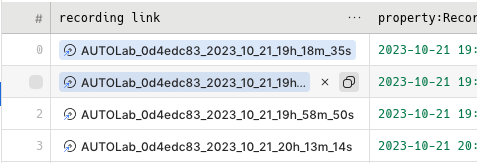
Rerun now detects links known url formats (links to rrds, hub datasets, etc.) and shows them as a compact link button:
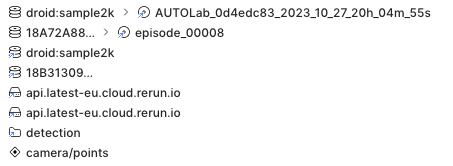
Previously these all would all be shown as a plain link. The Rerun Hub dataset open button has been reworked as well:
Import HDF5 data using the chunk processing API
This release introduces Hdf5Reader, which reads an HDF5 file into a lazy stream of chunks — each group becomes an entity, each dataset a component:
from rerun.experimental import Hdf5Reader, IndexColumn

reader = Hdf5Reader("episode.h5")
store = reader.stream(index_column=IndexColumn.timestamp("/time", input_unit="s")).collect()
Improved video chunk reader
Mp4Reader (Rust & Python) can now plumb data through FFmpeg to remove unsupported B-frames, transcode to different output formats, adjust gop size, and take advantage of some GPU accelerated codecs.
Also added improvements around reporting unsupported codecs more clearly, and handles large MP4 offsets without crashing.
This is experimental so we are still iterating on how to make it as seamless as possible to go from mp4 to RRD.
Feedback is welcome!
Time-windowed and corrupted MCAP conversion
You can now read a selected time range from a source MCAP file.
The corresponding option is available both for the Python McapReader and the CLI (see rerun mcap convert --help).
Besides simple time filtering, this also enables large recordings to be converted and optimized in bounded windows instead of loading the entire recording at once. In a 20 GB test recording, processing 32 windows reduced peak memory use from about 26 GB to 1.4 GB and reduced wall-clock time from 14.3 seconds to 5.8 seconds. Some user code is required to loop over windows in the source MCAP.
The converter can also read corrupted MCAP files directly without a separate recovery pass.
When the recover option is enabled in McapReader or CLI, the converter will attempt to recover the missing summary and index on-the-fly during processing.
Improved ROS 2 timestamp handling
All ROS 2 MCAP messages that have a top-level std_msgs/msg/Header "header" or a builtin_interfaces/Time "stamp" field now appear also on the ros2_timestamp timeline in addition to the standard MCAP log and publish timelines.
Previously, the ros2_timestamp timeline was only populated for ROS messages that were converted to Rerun archetypes.
Now this is supported for any ROS message that goes through schema reflection (e.g. custom ROS message types), making it easier to see all data in header timestamp order if desired.
Breaking changes
StateChange.state is now an array
The state field of the StateChange archetype now takes an array of values instead of a single value.
Each entry gets its own lane in the state timeline view, so one entity can track several states at once (e.g. the buttons of a gamepad).
Nothing changes on the wire or in stored recordings — this only affects the SDK APIs.
Rust
with_state now takes an iterator of values, so passing a single string no longer compiles.
Use the new StateChange::single convenience constructor, or pass an array:
// 0.34
rec.log("door", &rerun::StateChange::new().with_state("open"))?;

// 0.35
rec.log("door", &rerun::StateChange::single("open"))?;
// or, equivalently:
rec.log("door", &rerun::StateChange::new().with_state(["open"]))?;
To reset the state of individual instances, use the new with_state_opt, where a None entry resets that instance's lane:
rec.log("buttons", &rerun::StateChange::new().with_state_opt([Some("Idle"), None]))?;Python
No action needed.
rr.StateChange(state="open") keeps working, and state=["idle", "pressed"] is now supported for multiple lanes.
C++
No action needed.
rerun::StateChange().with_state("open") keeps working, and with_state({"idle", "pressed"}) is now supported for multiple lanes.
ParquetReader index columns now use IndexColumn
The experimental ParquetReader's index_columns argument no longer takes (name, type[, unit]) tuples.
Pass IndexColumn values instead, built with the timestamp/duration/sequence constructors (the timeline kind is the constructor you pick, and unit is now the keyword-only input_unit):
# 0.34
ParquetReader(path, index_columns=[("frame", "sequence"), ("ts", "timestamp", "ms")])

# 0.35
from rerun.experimental import IndexColumn

ParquetReader(path, index_columns=[IndexColumn.sequence("frame"), IndexColumn.timestamp("ts", input_unit="ms")])
--follow has been removed
Rerun no longer supports tailing .rrd.
If you previously used this for live workflows, tee the data to multiple sinks instead, e.g. log to both the viewer and an .rrd file from the producing process.
See the sink documentation page for more information on how to set up teeing.
Looking for an older release? See the migration guides for 0.33 and earlier.