The following sections give an overview of the basic UI concepts and where to find which functionality.
Most items in the UI show a tooltip with more information when you hover them. If information is missing, file an issue.
Overview
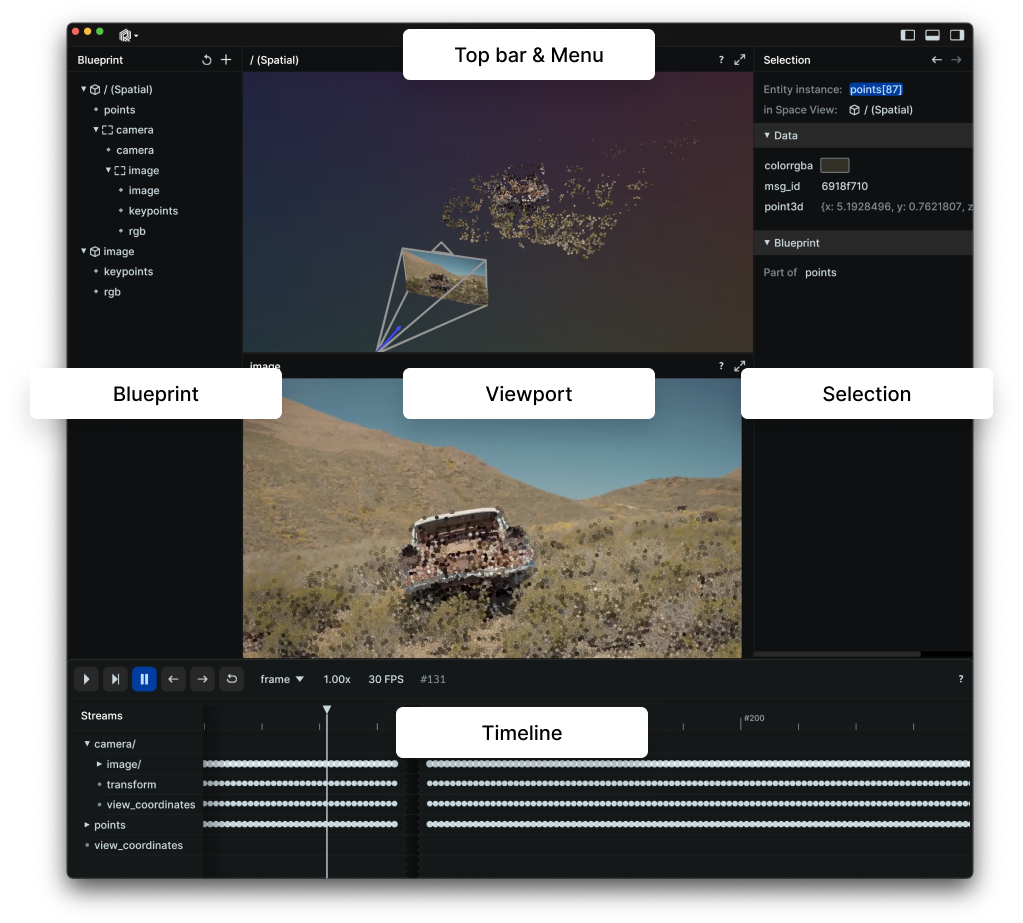
Blueprint
The blueprint panel is where you see and edit the blueprint for the whole Viewer, i.e. what is shown in the Viewer (and how it is shown).
Selection
The selection panel lets you see details and edit configurations of the current selection(s).
Timeline
The timeline panel gives you controls over what point in time you're looking at on which timeline for the rest of the viewer. Additionally, it gives you an overview of all events on a given timeline.
Viewport
The viewport is where your visualizations live. It is composed of one or more Views that you can arrange freely.
Top bar & menu
The top bar contains operating system controls and generic information. In the menu you find application wide options and actions. Use the buttons at the top right corner to hide/show parts of the viewer.
Command Palette
The command palette lets you run any action from anywhere by searching for it by name.
You reach it with cmd/ctrl + K or via the menu.

Once it's open just start typing to filter and press Enter to execute the selected action or cancel with Esc.
The command palette does not yet cover every UI action (#1132).
Help icons
Most views have an info icon at the top right corner.

On hover it displays additional information on how to use a view.