Highlights
Register a recording under any segment ID
DatasetEntry.register() takes an optional segment_id list, one per URI, to register each recording as a segment other than its recording ID.
It requires a server running Rerun 0.44 or Rerun Hub 0.21 or later.
IMPORTANT: once a dataset has such segment, it can no longer be queried by SDKs and viewers older than 0.44.
See How can I register a recording under another segment ID? for an example.
New features
Agent panel
The Viewer has a new agent panel: chat with a coding agent that can inspect and control the Viewer through the Viewer MCP tools. Open it with the agent button in the top right corner, or press Tab in the command palette to ask the agent directly. The panel is still experimental, and we would love your feedback. See Agents for how to set it up.
The panel runs the agent in one of two ways.
Your own coding agent (native Viewer only)
The panel starts a coding agent that is installed on your computer, such as Claude Code, Codex, Gemini CLI, GitHub Copilot CLI, OpenCode, Goose, or Cursor CLI. The agent drives the Viewer through the Rerun MCP server. This is the most capable option:
- It is your agent, with your subscription, so you need no extra API key.
- It keeps your configuration, such as
CLAUDE.md/AGENTS.md, skills, and your other MCP servers. - It can also work with files and run code on your computer, for example to write a script that logs more data.
Model API
The panel can also run the agent itself and call the Anthropic or OpenAI API directly.
This works in both the native and the web Viewer, and needs no agent installed.
On native, set ANTHROPIC_API_KEY or OPENAI_API_KEY in your environment; on the web, enter your key in the panel.
This agent can only use the Viewer and catalog tools and read the Rerun skills, not your files or your own agent configuration.
Previous releases shipped an early version of the panel behind an experimental setting.
Switch between a dataset's blueprints
When you open a recording from the catalog, a new dropdown in the top bar lets you switch between the blueprints registered for its dataset and the heuristic blueprint. This is the first step towards better blueprint management for datasets, with more improvements coming in future releases. See Blueprints for how to register blueprints on a dataset.
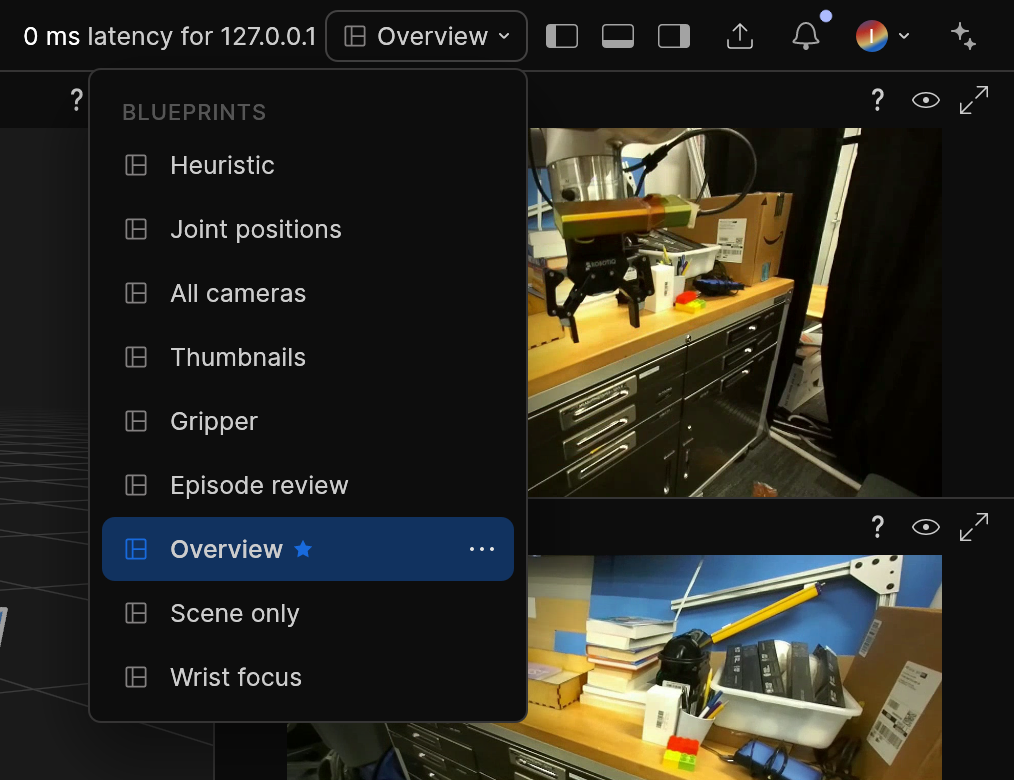
Resetting the current blueprint can still be done in the blueprint panel, but Reset to default blueprint and Reset to heuristic blueprint are now in the View menu and the command palette.
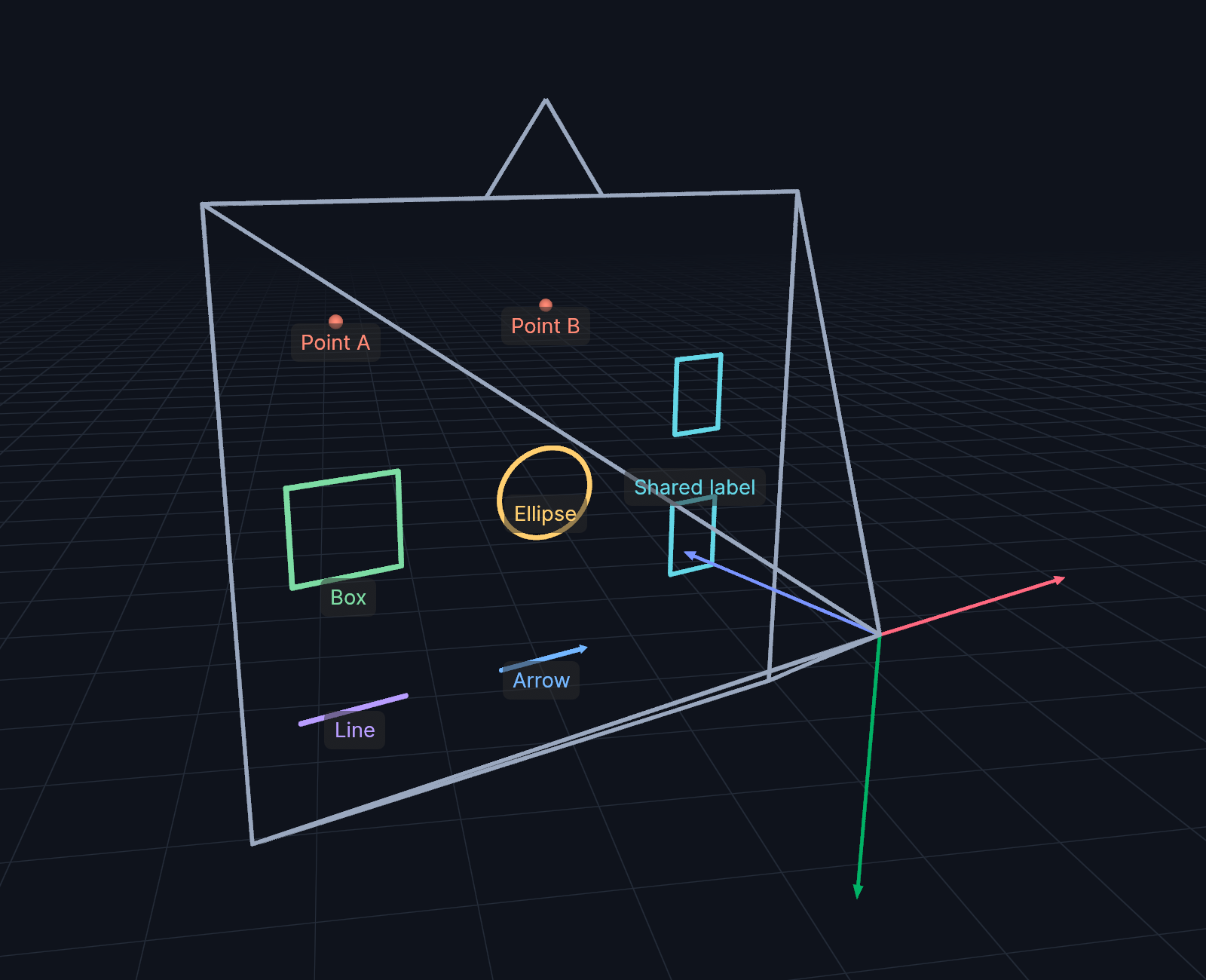
2D labels in 3D views
Labels on 2D points, lines, arrows, boxes, and ellipses can now be shown in 3D views. Camera-plane annotations stay attached to their geometry, with text facing the viewer.
Better preview card layouts
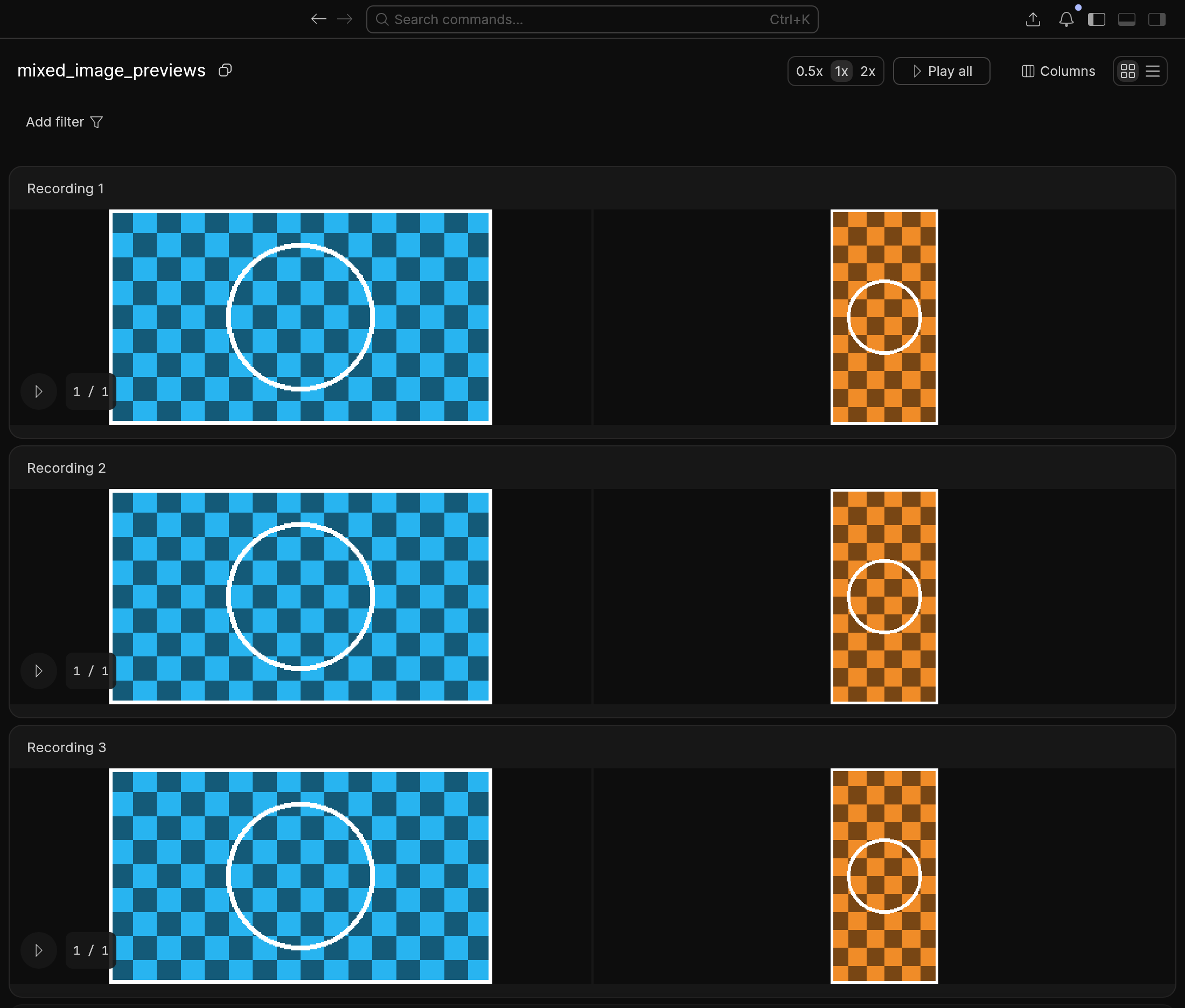
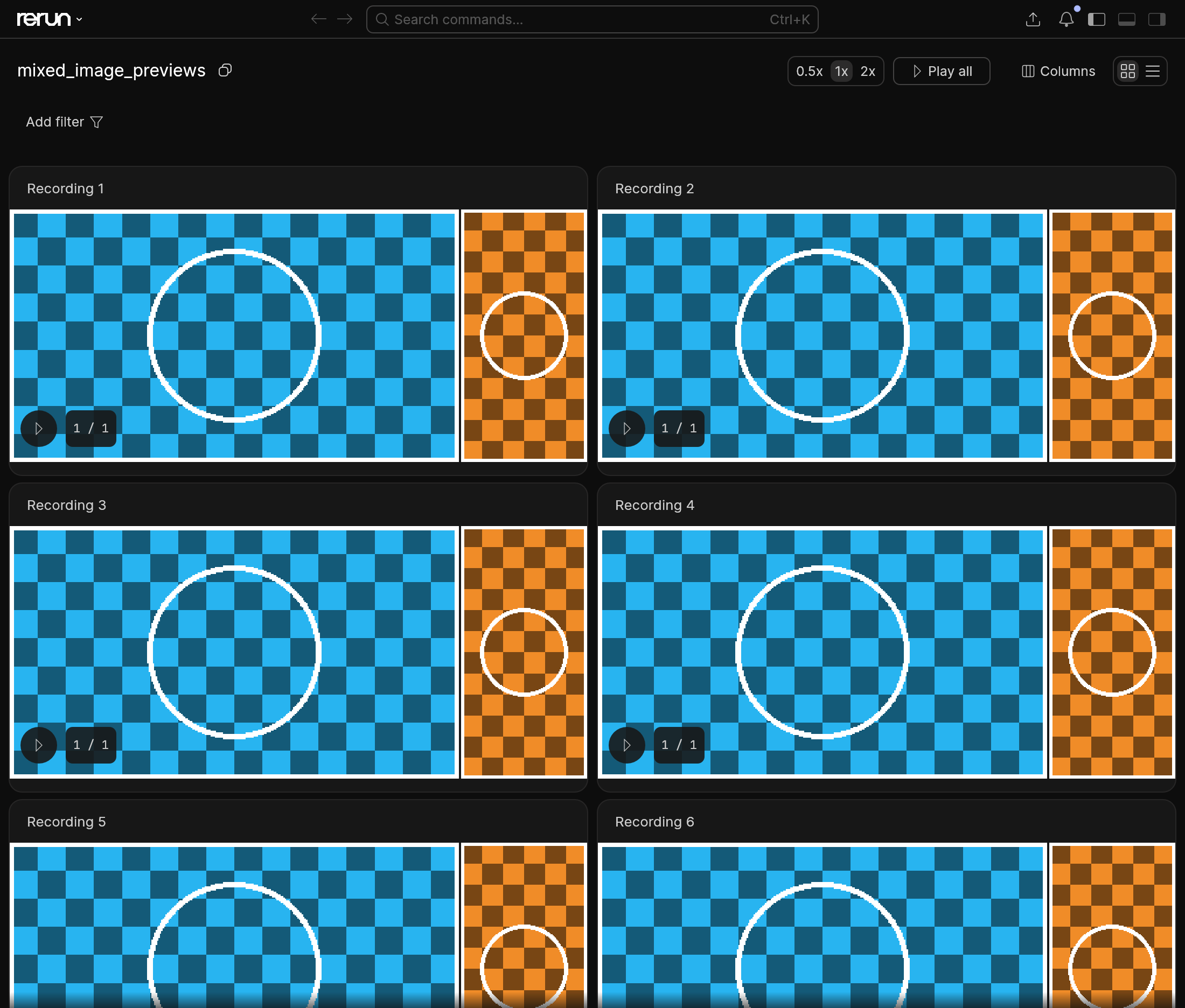
Table preview cards now size their views according to their aspect ratios and fit more cards across the available width. Landscape and portrait images can share a card with less empty space, and the grid adjusts as you resize the window.
The same mixed-image previews at the same window size:
| Before | After |
|---|---|
 |  |
MCP improvements
Catalog tools in the MCP server
rerun mcp now has catalog_* tools that connect to a Rerun catalog server directly. They can list and query datasets, their segments, schemas, segment properties, and data, with SQL over tables and query results.
By default they act on the catalog of the connected Viewer (if any); pass --catalog-url <url> for another server, and --toolsets catalog to run them without a Viewer.
The Viewer's agent panel has the same tools when it uses a model API, on native and on the web.
See the MCP server documentation.
Catalog write tools in the MCP server
The catalog tools of rerun mcp and of the Viewer's agent panel can now create datasets, rename datasets and tables, upload or register .rrd recordings into datasets, and register .rbl table blueprints as a dataset's default.
Each change asks you first, and none deletes or replaces data.
To keep an agent read-only, set "Catalog servers" to "Read only" in the agent panel's settings, or start rerun mcp --catalog-read-only.
See the MCP server documentation.
Discover available view types via MCP
Agents can use viewer_list_view_types to discover the connected viewer's supported view classes.
Short descriptions and tag keywords help find suitable views for visualization tasks like editing blueprints.
The same information is available through ViewerClient.list_view_types() in Python and WebViewer.listViewTypes() in JavaScript.
See the Viewer MCP documentation.
Shared list of catalog servers
The catalog servers you add in the Viewer are now also known to the CLI and to rerun mcp.
rerun servers list, rerun servers add <url>, and rerun servers remove <url> manage the list, and the catalog_list_servers MCP tool offers it to agents.
The native Viewer now only remembers servers you add or log in to, not those it merely opened from a URL.
On first start it moves the servers it remembered into the list, leaving out local ones.
The list lives in servers.json in Rerun's config directory, so Reset Viewer and rerun reset keep it, and a Viewer older than this release no longer shows these servers.
See the MCP server documentation.
Import MuJoCo (MJCF) models
Rerun can now open MuJoCo models from .mjcf files and from .xml files with a <mujoco> root.
Heightfields, SDF geoms, textures, and the <replicate>, <composite> and <flexcomp> elements are not supported yet.
Like with URDF, every body becomes a named frame, and the new rerun.mjcf.MjcfTree (re_importer::MjcfTree in Rust) computes the transforms that animate them from joint values, using MuJoCo's qpos convention.
Hinge and slide joints are supported.
A body with several joints gets an intermediate frame after each joint but its last, named {body}::{joint}, so that every joint can be animated on its own.
See Loading MJCF models.
Stream dataset selections as Arrow batches
Use DatasetSelection.read_arrow() to stream dataset selections as PyArrow record batches and process them incrementally.
Unlike reader(), which returns a lazy DataFusion DataFrame, read_arrow() starts the query and returns a stream of Arrow record batches.
See the streaming example.
Query annotated time spans
The experimental rerun.experimental.spans.SpanTable stores time span annotations, such as task labels and scores, for a dataset's recordings in a catalog table.
Add and edit spans with append and upsert, then select them with DataFusion filters on reader(), joined with the recordings' properties.
See Curating annotated time spans for a walkthrough.
Measure dataloader pipeline performance
RerunIterableDataset now collects cumulative fetch and decode metrics automatically across PyTorch DataLoader workers.
Read dataset.metrics.summary() to get a flat dictionary of fetch versus decode time, direct HTTP range merging, GOP decode amplification, and skipped samples.
An optional prefix makes the dictionary directly usable with experiment trackers such as MLflow and Weights & Biases.
Reports are cumulative aggregates of completed worker measurements.
Docs: Dataloader
Other
Clone view containers: Right-click a container and choose Clone to copy its views and nested containers along with their layout and settings. The copy can be edited independently and shares the original recorded data.
URDF material colors match RViz: The
rgbaof a URDF material is now used as an sRGB color, the way RViz displays it, instead of being converted from linear space. Colored URDF models therefore look darker than before, and match what RViz shows.Import multiple files with the Python SDK: Python's
log_file_from_path()accepts an iterable of local paths.Format-independent kinematics API:
re_importer::UrdfTreenow implements the newre_importer::KinematicTreetrait, which returns its transforms asre_importer::JointTransform. The trait is shared with the new MJCF importer, sore_importer::MjcfTree(rerun.mjcf.MjcfTreein Python) drives a MuJoCo model through the same API. Existing code keeps working, with these deprecations:- In Rust,
re_importer::urdf_joint_transform::compute_transform3dis deprecated in favor ofurdf_joint_transform::compute_joint_transform(convert the result withTransform3D::from), orUrdfTree::compute_joint_transformto apply the frame prefix.urdf_joint_transform::Erroris now a deprecated alias ofre_importer::UnsupportedJointType, andurdf_joint_transform::internal::JointTransformofre_importer::JointTransform(warningis nowwarnings). - In Python,
rerun.urdf.UrdfTree.log_urdf_to_recordingis deprecated in favor oflog_to_recording.
compute_joint_transform_batchesnow logs clamping warnings once per call instead of once per clamped value. The single log line contains the first warning and the number of further warnings in the batch.- In Rust,
Read and change the Viewer settings over ViewerControl:
ViewerClient.get_settings()andViewerClient.set_settings()in Python, and theviewer_get_settingsandviewer_set_settingsMCP tools, read and change the Viewer's app settings as JSON. Secrets, such as the Mapbox access token, are left out. See Changing settings.Inspect an MP4 file without streaming it:
rerun.experimental.Mp4Reader.info()returns anMp4Infowith the codec, dimensions, frame count, GOP sizes, and a per-frame Arrow table of the file, read from the container metadata alone.Mp4Info.keyframe_timestamps_nslists the keyframes without streaming the video, and without FFmpeg for sources with B-frames.Reduce iterable dataloader scheduling memory:
BlockShuffleandNoShufflenow use substantially less worker memory when iterating large datasets. This improves startup memory use for ordinary and curated iterable datasets.Blueprint override path warnings: The Python SDK now warns when a blueprint view override path contains a wildcard, such as
/boxes/**. Use the full path of each entity instead.
Breaking changes
rerun viewer-mcp is now rerun mcp
The MCP server's subcommand is now rerun mcp, since it will offer more than Viewer control.
Re-register it with your agent:
# Before
claude mcp add rerun -- rerun viewer-mcp

# After
claude mcp add rerun -- rerun mcp
In an mcp.json, change "args": ["viewer-mcp"] to "args": ["mcp"].
If you added it under a name other than rerun in the Viewer's agent panel settings, change its command line there too.
The standalone binary for Rerun developers is now rerun-mcp, built from the re_rerun_mcp crate.
MCP viewer tools are now named viewer_*
The Viewer tools of rerun mcp are now prefixed viewer_ instead of rerun_, e.g. viewer_get_state instead of rerun_get_state.
This keeps them apart from the catalog tools the server is gaining.
If your agent's settings allow or deny these tools by name, update those names:
- mcp__rerun__rerun_get_state
+ mcp__rerun__viewer_get_state
The @rerun-io/web-viewer npm package sends usage data by default
The @rerun-io/web-viewer npm package now sends usage data, like the native viewer and rerun.io/viewer already do.
The first time a browser opens a web viewer that sends usage data, the viewer shows a one-time notice.
Like the native viewer, it sends nothing during that first visit, so users can turn usage data off before anything is sent.
Users can turn usage data off in Settings, in every viewer.
The new analytics option of WebViewerOptions is "on" (the default) or "off".
Pages that embed the viewer in an iframe choose the same way with the analytics query parameter, e.g. ?url=…&analytics=off.
Web viewers started by rerun --web-viewer, rr.serve_web_viewer() and the notebook follow rerun analytics disable.
Migration
To keep the old behavior of the npm package and send no usage data, set analytics to "off":
const viewer = new WebViewer();
await viewer.start(url, parent, { analytics: "off" });
If you leave usage data on in an application you ship, consider mentioning Rerun in your privacy policy.
Blueprint APIs return RegisteredBlueprint instead of blueprint ID strings
register_blueprint on DatasetEntry and TableEntry takes an optional name as its second argument.
A name is unique among the blueprints of the dataset or table, and registering under a name another blueprint has raises AlreadyExistsError.
A blueprint registered without a name has none, and can be named later with RegisteredBlueprint.rename.
Registering a blueprint without a name logs a warning once per process.
set_default is now keyword-only.
Passing it by position still works, with a deprecation warning.
The blueprint methods take and return a rerun.catalog.RegisteredBlueprint, which has the blueprint's id, name and kind, instead of a blueprint ID string.
kind is "recording" or "table".
This covers register_blueprint, blueprints, default_blueprint, set_default_blueprint, default_segment_table_blueprint and set_default_segment_table_blueprint.
get_blueprint_by_name is new on DatasetEntry and TableEntry.
A blueprint of the dataset's segment table is registered with the new DatasetEntry.register_table_blueprint.
Migration
Python, before:
dataset.register_blueprint(uri)
dataset.register_blueprint(other_uri, False)
[first, second] = dataset.blueprints()
dataset.set_default_blueprint(second)
assert dataset.default_blueprint() == second
Python, after:
dataset.register_blueprint(uri, "overview")
second = dataset.register_blueprint(other_uri, "timeseries", set_default=False)
dataset.set_default_blueprint(second)
assert dataset.default_blueprint() == second

second = second.rename("plots")
assert dataset.get_blueprint_by_name("plots") == second
assert {blueprint.name for blueprint in dataset.blueprints()} == {"overview", "plots"}
Code that used the blueprint ID string can read it from RegisteredBlueprint.id.
UrdfTree.from_file_path splits entity_path_prefix into path parts
Fixed a bug where UrdfTree.from_file_path treated entity_path_prefix="world/robot" as a single entity path part.
It now interprets the prefix as two entity path parts, matching the behavior of log_file_from_path.
If you rely on the old parsing behavior, pass rr.escape_entity_path_part("world/robot") as the prefix to preserve the single-part path.
Dataloader curations replace sampling manifests
Replace the experimental Manifest / from_manifest() API with Curation.from_source() and DataSource(dataset, curation=curation); v1 manifest files must be regenerated as curations from selected recordings and optional span intervals.
The resolved Arrow output is the training manifest; content filters, fields, and sampling remain loader configuration, Field.max_staleness is removed, and iterable loaders skip unresolved samples instead of enforcing strict frozen replay.
Bulk SpanTable.write() with mode="append" or "overwrite" now generates IDs and rejects supplied non-null IDs; use mode="upsert" with nonempty, non-null IDs to preserve them.
ImportedData and SplitFrom have named fields
The variants of the Rust ImportedData enum, which custom importers send, now have named fields instead of positional ones.
Chunk and ArrowMsg have importer_name, store_id, and chunk or msg.
LogMsg has importer_name and msg.
The SplitFrom variants of ChunkDirectLineage and ChunkDirectLineageReport (see ChunkStoreDiffAddition::direct_lineage) also have named fields now.
Migration
Rust, before:
let data = ImportedData::Chunk(importer_name, store_id, chunk);Rust, after:
let data = ImportedData::Chunk {
    importer_name,
    store_id,
    chunk,
};
Matches change the same way, e.g. ImportedData::LogMsg(_, msg) becomes ImportedData::LogMsg { msg, .. }.
ChunkDirectLineage::SplitFrom(parent_id, sibling_ids) becomes ChunkDirectLineage::SplitFrom { parent_id, sibling_ids }.
ChunkDirectLineageReport::SplitFrom(parent, siblings) becomes ChunkDirectLineageReport::SplitFrom { parent, siblings }.
Looking for an older release? See the migration guides for 0.33 and earlier.