Robotics
Robot data preprocessing example
Assemble a robot recording from multiple file sources with Rerun's chunk processing API and preprocessing steps.
This example demonstrates how Rerun's chunk processing API can be used to assemble a robot recording from multiple file sources, including preprocessing to modify or augment the data.
Introduction
Input data
While the example uses simulated data, it's intentionally designed to cover real-world challenges that should sound familiar to most roboticists:
- incomplete data requiring preprocessing
- custom data types
- bugs in the recorded data
- data spread across multiple files in different formats
Specifically, we use a recording of a dual-robot-arm setup, consisting of:
episode.mcap | offsets.json | URDF files |
|---|---|---|
| Base recording (videos, sensors, …). | Static world offsets for each robot. | Robot & scene models as URDF. |
| Some cameras have wrong parameters. No dynamic 3D transforms were recorded, only joint states in a custom Protobuf schema. | Saved outside of base recording. | robot.urdf, scene.urdf, mesh data |
Goals
Our task is to handle and process all the different data sources:
- read, convert and fix MCAP data
- compute 3D transforms using MCAP joint states and URDF
- handle URDFs
- add
scene.urdfand 2xrobot.urdf - modify visual meshes with a custom color & transparency per robot
- add
- add static transforms from JSON
…and merge them into one coherent recording.
Processing pipeline
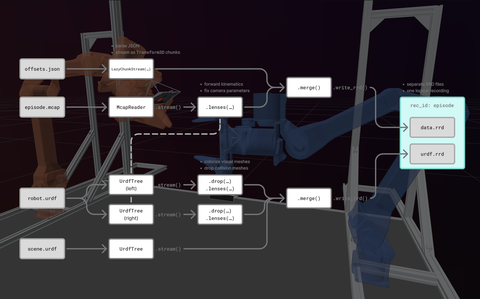
Solving such a task in an elegant way requires a non-trivial amount of engineering, but Rerun's chunk processing API gives us all the tools to properly structure the pipeline:

The example code implements this pipeline and contains several explanatory comments.
We recommend reading the concept explanations below, before going through the main() function of robot_data_preprocessing.py to understand the code structure.
ℹ️ Note that we create two separate RRD files in this example. For the Rerun Viewer or Catalog, both physical files form one logical recording since they specify the same recording ID.
Chunk streams
Chunks are the core datastructure of Rerun. In this example, we use chunk streams as the "glue" of our pipeline.
In a nutshell, LazyChunkStreams allow us to define how Chunks get routed through filtering, transformation and output steps.
As the name suggests, these streams are lazily evaluated.
We use an expressive Python API to define the pipeline, but the final execution happens in a multithreaded, GIL-free execution engine written in Rust for maximum efficiency.
In this example, we use the following sources that can emit LazyChunkStreams:
McapReader.stream()for the MCAP recordingUrdfTree.stream()for the URDF models- manually constructed
LazyChunkStreamfor the custom JSON file, usingChunk.from_columns(…)
Lenses
Lenses allow us to modify the chunks' components via MutateLens, or to derive completely new components from them via DeriveLens.
In both cases, we use Selectors to extract component fields we're interested in, and pipe them through custom transformation functions.
MutateLens example
A simple MutateLens used in this example is the one that fixes the swapped Pinhole:resolution component of the external camera streams:
mcap_stream.lenses(
    MutateLens(
        "Pinhole:resolution",
        Selector(".").pipe(
            lambda resolution: pa.array(
                [(height, width) for width, height in resolution.to_pylist()], type=resolution.type
            )
        ),
    ),
    content=["/external/cam_low", "/external/cam_high"],
    output_mode="forward_unmatched",
)
The content filter makes sure that this lens only gets applied to the external camera entities, while the output_mode makes sure we forward the other pinhole entities that don't match unchanged (here: the robot cameras that don't require the fix).
DeriveLens example
A more complex lens setup is required for the forward kinematics, i.e. to compute the 3D transforms from joint values (angles, distances). For this we need the recorded joint states from the MCAP, as well as the URDF for the kinematic structure.
Our MCAP file contains joint states encoded in a custom Protobuf schema:
message JointState {
  google.protobuf.Timestamp timestamp = 1;
  repeated string joint_names = 2;
  repeated double joint_positions = 3;
  repeated double joint_velocities = 4;
  repeated double joint_efforts = 5;
}
This custom schema is not part of the directly supported message types of the MCAP importer (like e.g. the video streams). But thanks to schema reflection, we still get chunks with queryable Rerun components that we can process in our streams.
Each input row of joint states contains N joint values that map to N 3D transforms, for which we want to have a dedicated output row with Transform3D each.
Due to this input-to-output row length mismatch, we use two sequential lenses:
- For each joint state message…
- select the joint names and values
- use
UrdfTree.compute_joint_transform_batches - output a single row with a list of
N3D transforms.
- Scatter each computed row into
Nrows withTransform3Dcomponent columns.
Others
Besides fixing camera data and computing forward kinematics, we also apply lenses for smaller things like URDF model colorization.
Finally, the streams are merged and written to two RRD files with the same recording ID to form layers of a single logical recording. We use two RRDs for demonstration purposes, but merging into a single RRD would be also possible.
See the code for all implementation details.
Run the code
pip install -e examples/python/robot_data_preprocessing
python -m robot_data_preprocessing
The resulting RRDs can be opened in the viewer:
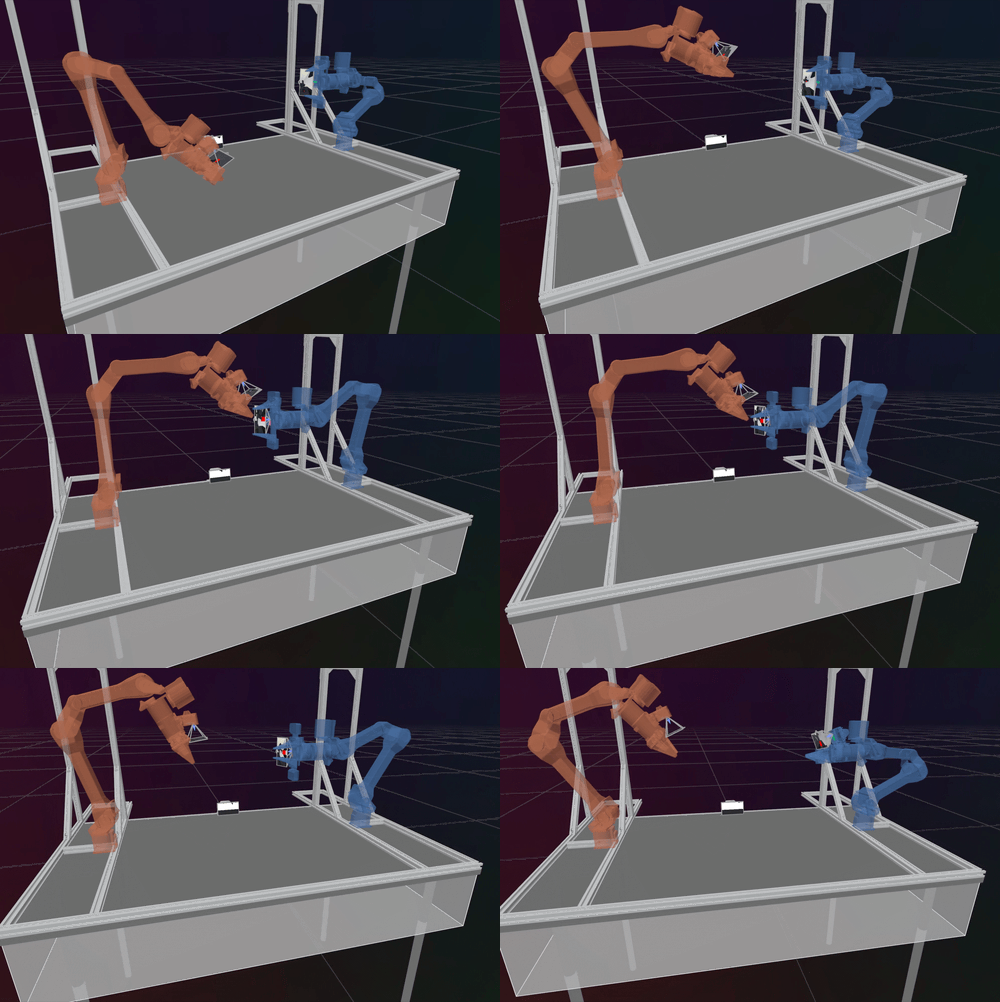
rerun examples/python/robot_data_preprocessing/output/*.rrdSince we use consistent recording IDs, the two output RRD layers show up as a single recording.
Summary
We showed how a non-trivial robotics problem can be solved through a structured data pipeline. The chunk processing API provides the tools to build such custom pipelines in a compact manner (here: < 200 lines of Python code) while having a powerful execution engine under the hood.
We also demonstrated how recording IDs can be used to structure RRDs into logical recordings, allowing also to potentially add more layers (e.g. for metadata or extra sensor data).
Documentation links for further reading:
Going further
In a real-world setting, this kind of processing would be only the first step of data curation, to finalize multiple raw recordings before ingesting them to central storage.
With Rerun, this would mean registering a dataset to a catalog server (either via Rerun Hub for enterprise scalability, or using the open-source rerun server for small-scale local development).
This enables e.g. to perform queries across recordings for analytics or to export training data.