Robotics
ROS node
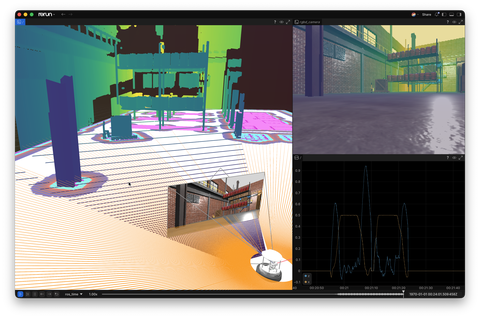
A minimal ROS 2 Python node that forwards pose, images, scans, point clouds, and velocities into Rerun.
A minimal example of creating a ROS node that subscribes to topics and converts the messages to Rerun log calls.
The solution here is mostly a toy example to show how ROS concepts can be mapped to Rerun.
Used Rerun types
Image, DepthImage, Pinhole, Transform3D, GridMap, Points3D, LineStrips3D, Scalars
Background
The Robot Operating System (ROS) helps build robot applications through software libraries and tools. Although Rerun doesn't have native ROS support, you can easily create a basic ROS 2 Python node to subscribe to common ROS topics and log them to Rerun. In this example, Rerun visualizes simulation data, including robot pose, images, camera position, laser scans, point clouds, and velocities, as the robot navigates the environment.
Logging and visualizing with Rerun
Find the detailed code walkthrough and explanation for visualizing this example here: Using Rerun with ROS 2.
For more information on future improved ROS support, see tracking issue: #1527
Run the code
Dependencies
NOTE: Unlike many of the other examples, this example requires a system installation of ROS in addition to the packages from requirements.txt.
The commands are focused on the official ROS installation path on an Ubuntu distro, but should also work analogously if you installed ROS through Robostack.
This example was developed and tested on top of ROS2 Kilted Kaiju, with Nav2 and the Turtlebot 4 simulation example from the nav2_bringup package.
If you use another version of ROS, e.g. Jazzy, you should be able to just replace kilted with jazzy in the commands below.
Installing ROS is outside the scope of this example, but you will need the equivalent of the following packages:
sudo apt install ros-kilted-desktop ros-kilted-nav2-bringup(ros-kilted-nav2-bringup pulls in all the navigation and simulation packages we need as dependencies, if not installed yet)
Then clone the Rerun repository to get the example code:
git clone https://github.com/rerun-io/rerun.git  # Clone the repository
cd rerun
git checkout latest  # Check out the commit matching the latest SDK release
Make sure to use a Python virtual environment. Here, we use venv (sudo apt install python3-venv):
python3 -m venv --system-site-packages rerun-ros-example
source rerun-ros-example/bin/activate
Then install the latest Rerun SDK and the necessary libraries specified in the requirements file of this example:
pip install --upgrade rerun-sdk
pip install -r examples/python/ros_node/requirements.txt
In addition to installing the dependencies from requirements.txt into a venv you will also need to source the
ROS setup script:
source /opt/ros/kilted/setup.bashRun the code
First, in one terminal launch the Nav2 turtlebot demo:
source /opt/ros/kilted/setup.bash

ros2 launch nav2_bringup tb4_simulation_launch.py headless:=False
This should open two windows for Gazebo and RViz. Use the RViz window to initialize the pose estimate to put the robot on the map, and set a navigation goal to let it move.
You can now connect to the running ROS system by running this in a separate terminal:
source /opt/ros/kilted/setup.bash

python examples/python/ros_node/main.py # run the example
If you wish to customize it, or explore additional features, use the CLI with the --help option for guidance:
python examples/python/ros_node/main.py --help